
Ransom is a easy reversing challenge on Hack The Box. The description is “We received an email from Microsoft Support recommending that we apply a critical patch to our Windows servers. A system administrator downloaded the attachment from the email and ran it, and now all our company data is encrypted. Can you help us decrypt our files?”
The first step of our reverse engineering adventure is to run file on the binary with file windows_update.exe We have another Windows binary, but there does not to seem to be any packing, so let’s open it up in Binary Ninja.

After decompiling it, there are a lot of functions. The one that catches my attention the most though is an encrypt function.
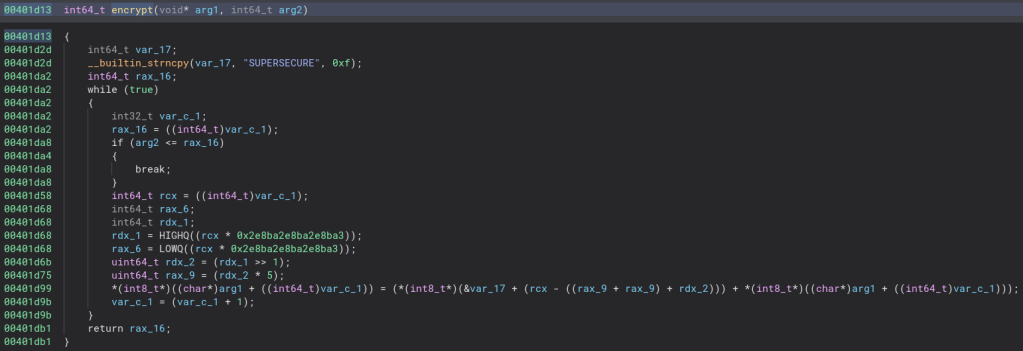
Let’s clean the code up a bit and see if we can make sense of the decryption algorithm.

That is indeed much easier to read. The odd math is simply the iterator divided by the length of the key so the file length being longer than the key does not break the code. It looks that way become my version of Binary Ninja is old and it does not show that kind of division very well. Let’s rewrite the encryption algorithm so we can read it easier.
for (i = 0; i < fileLength; i = i + 1) {
    file[i] = key[i % 11] + file[i];
}
Now all we need to do is create a script to reverse this encryption and run it on the encrypted file that came with the binary and we should have the flag!
Here is the python script I came up with to decrypt the file.
key = b"SUPERSECURE"
with open('login.xlsx.enc', 'rb') as file:
    fileData = list(file.read())

for i in range(len(fileData)):
    fileData[i] = fileData[i] - key[i % 11]
    fileData[i] = fileData[i] & 0xff

with open('login.xlsx', 'wb') as file:
    file.write(bytes(fileData))
Let’s give this script a run and see if it decrypts the file.

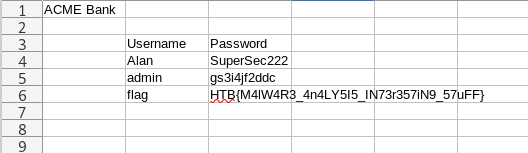
Looks like it does! This challenge is quite easy, but I did get stuck for a while trying to write the decrypt python script since I kept overflowing or underflowing. Thankfully stackoverflow showed me the & 0xff trick and really saved me. Thanks for reading and happy reversing!


Leave a Reply