
Lockpick is an easy difficulty set of malware analysis challenges based on a ransomware virus. The description is “Forela needs your help! A whole portion of our UNIX servers have been hit with what we think is ransomware. We are refusing to pay the attackers and need you to find a way to recover the files provided.”
Instead of going through the answers for all the questions, we are going to look at the malware and the script I used to decrypt it all. First, we run the file command on the malware executable.

It is an ELF file, so next we open it up in Binary Ninja. Looking at the main function we see another function and some interesting arguments passed. We are going to want to keep those arguments in our thoughts as they will be useful later.

Looking into that function there are a few interesting things. The first I notice is a long string compare checking for file extensions. This is the list of file extensions that get encrypted by the ransomware. This screenshot is just a portion of them as it is way too long to fit all of it into one.

Next, there is an encrypt file function. This is the main one we want to check out. Also notice that the second argument is passed into this function.

Going into the encrypt file function, we see a moderate amount of code, but one thing really sticks out. It looks like an XOR using argument two as the key.

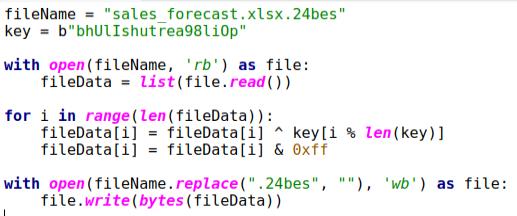
Now that we know how the files are encrypted and the key we can begin decrypting them. Here is a simple script that uses Python to open the files, XOR them with the key, and then write them back out while taking off the “.24bes” extension. All we gotta do is put the different file names into the script, and we have all of our original files back. Now we are able to answer all the questions.
This was a fun challenge as I love XOR encryption and when people leave the keys easily viewable. Thanks for reading and happy reversing!
 bu5hv1p3r's site
Leave a comment