Have you found a program vulnerable to a buffer overflow attack and need to craft some shellcode to exploit it? Well, this is the post for you. For this tutorial I am writing the assembly for x86_64 NASM on Linux with Intel syntax. With that out of the way, let’s get into it.
First, we are going to create a simple Hello, World! program in assembly. I am not going to explain this code, but you should be able to understand it if you are wanting to write shellcode.
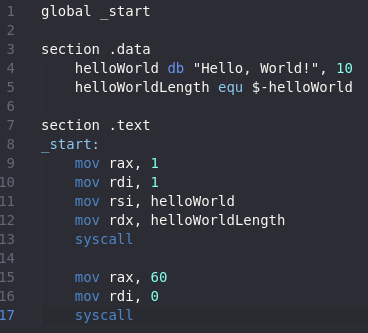
This is the result of that code.

In order to turn assembly into shellcode there are a few rules we need to follow. First, we cannot use the .data section. Secondly, we can not have any double 0s in the instructions. Since double 0s are line terminators, they may stop the code early. First, we are going to deal with the .data section problem. Instead of using the data section, we are going to push the data to the stack and use the RSP register to move it to the RSI register.
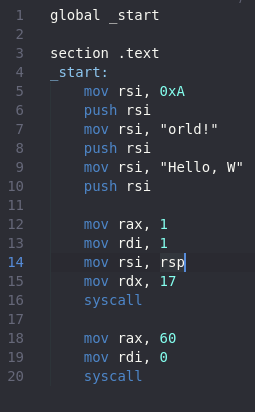
We push the new line first and the Hello, W last because of how the stack works. Since it is first in last out, we will always have to do it backwards. We also can only do a max of 8 characters per push since we are writing in 64 bit which is why we need to split it up into multiple lines. Instead of using the data section to give us the length of the variable, we are going to hardcode it instead. If we run the code again we get the same result.

Now onto the no double 0s part. If we look at the code using the command “objdump -d helloword” you should quickly notice a problem.
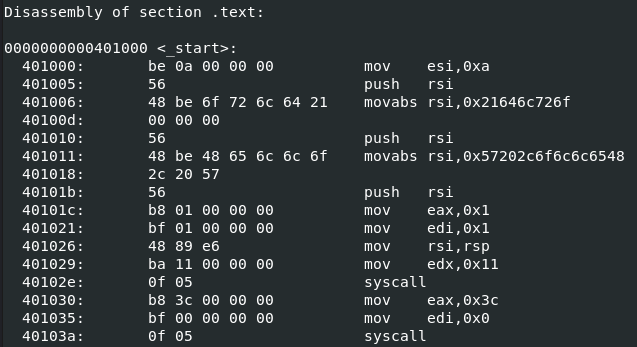
There are a lot of double 0s. The first step to fixing this is changing the registers we are using. For some of the instructions we need to use the smaller sections of the register instead of the full thing. For example, instead of moving 0xA into RSI, we can move it to AL instead, which is the smallest section of the RAX register. If we look at the program again in objdump, we can see the double 0s are all gone.
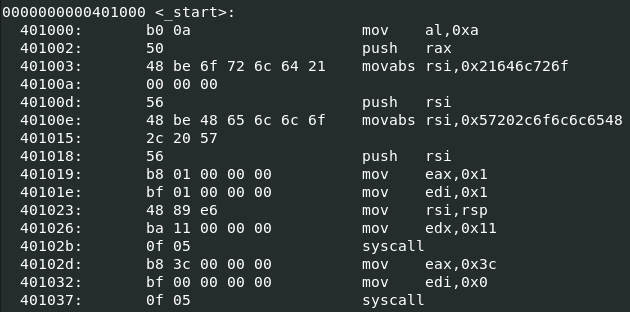
Now, we just need to do that for the rest of the code. There is a slight issue though with pushing “orld!” to the stack. It is not the full 8 characters, but it is too long to use EAX. What I choose to do was pad it with three spaces. After fixing the correct registers for the section of code pushing the text, this is what it should look like.
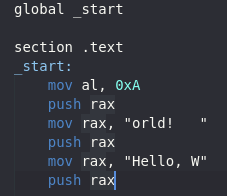
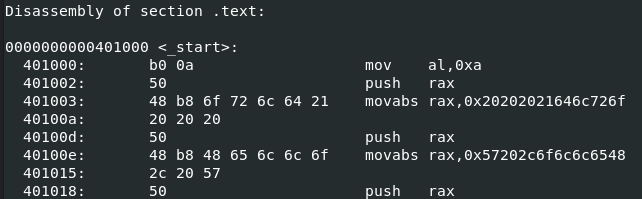
Now we continue on to the next section and do the same thing. Do not forget we need to 0 out the RAX register before using it again. Here is the code up to this point.
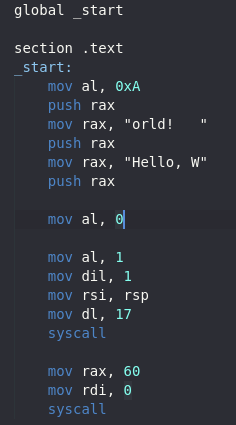
Looking at the objdump there is another problem. Moving 0 to AL cause us to have a double 0.
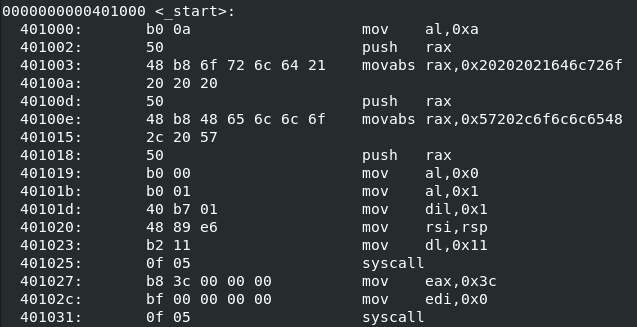
To fix this we use the instruction “xor rax, rax” instead. XORing a register with itself puts a 0 without breaking our code. We also replace the other “move rdi, 0” with “xor rdi, rdi”. We also need to fix the “mov rax, 60” while we are here. Here is what that code looks like now.
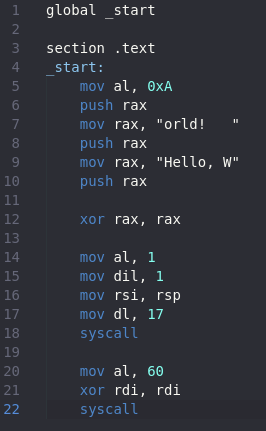
And the objdump.
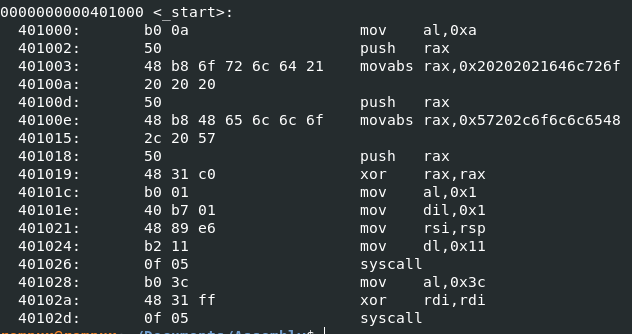
Finally, no more double 0s!! Now all that is left is to turn it into actual shellcode using pwntools for python. Here is a very simple script to do that.

And running it returns us with this.

We have shellcode! Now to test if it works once again using pwntools. Here is a simple script to run shellcode.

And here is the result.

Now time to go explore and figure out different kinds of shellcode programs you can make. Thanks for reading and happy reversing!
 bu5hv1p3r's site
Leave a comment