SHA256:09a1c17ac55cde962b4f3bcd61140d752d86362296ee74736000a6a647c73d8c
I was looking for an interesting and simple malware sample to analyze and I came across this simply named “0.exe”. I was able to get the second stage of this malware since it is included in the dropper and not downloaded from the internet like the last malware I analyzed. Much to my surprise, when I was going through it, I realized it was Gh0st RAT! Gh0st RAT is, as the name says, a remote access trojan and spyware made in China. The jump from malware probably just made by some random guy, to malware used by nation states was quick. In this post we will go over the very simple dropper and the next post will be about the actual malware itself.
First I will run the file command per usual. Just a regular Windows executable. Let’s open it up in Binary Ninja.

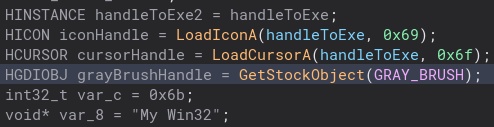
Like my last post, I went through and renamed variables and changed types to make the code easier to read. As usual the _start function is mostly boiler plate code, so let’s open up the main code of the dropper. The first things I notice are some handles to icons and even a gray brush. Not sure why they added that, but it is there.
Scrolling down further in this function, we get to some file related stuff as well as the functions that drop a malicious DLL as well as a malicious executable pretending to be a JPG. The DLL file is given a random number name.

Next we are going to look at the dropDLL function. I assume this resourceHandle is where the program gets the code for the DLL file, but I could not figure out exactly how it worked.

Scrolling a bit past that we get to where the actual file is created. Nothing too crazy here.
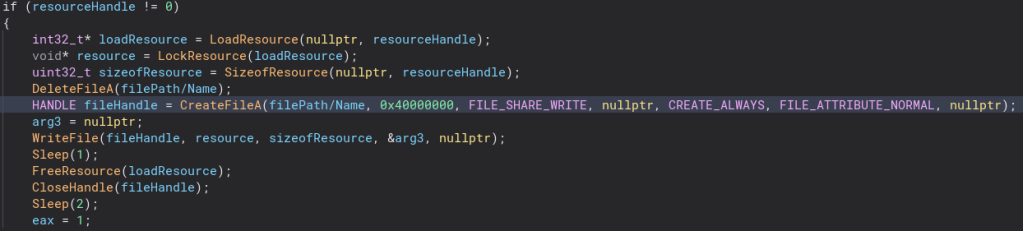
Going into the dropJPG function, it is much the same, except instead of a DLL with a name of random numbers, this file is named “NT_PATH.jpg”, but the contents of this file are the exact same. This may be to trick people who have file extensions turned off since they made expect to to actually be a picture and click on it, only instead of seeing a cute cat someone is watching them through their webcam.

Unlike the dropDLL function, this one has WriteFile in a few places. Here they are.


After we drop those files, we then start and configure a service. The service is named RemoteAccess. I am not 100% what this service does, but it may be used again in the second stage.


After this service related code, there is a call to the function regKey.

Inside of this function a registry key with the name “SYSTEM\CurrentControlSet\Services\RemoteAccess\RouterManagers\Ip” is given the value “DLLPath” and closed.


That is all for that function. Stepping back out and into the main function, there is some event code. An event is created with the name “Glable__Wait” like the service function it does not seem to do anything but maybe it is also called on later by the second stage.

Finally, the second stage DLL is loaded and that is the end of the program!

I know droppers are not the most interesting thing in the world, but the next post will be. Thanks for reading and happy reversing!
 bu5hv1p3r's site
Leave a comment